Choose a clear photo
Avoid a face hidden by shadow or hair. Keep the full hair silhouette and do not crop hands or feet at the edge when they matter.
A recognizable portrait depends less on using many colors and more on preserving the hair silhouette, face shape, feature placement and signature clothing. Direct photo downsampling often creates gray edges and fragmented shading. Choose the crop first, then use a grid and palette large enough for the identity details that matter.
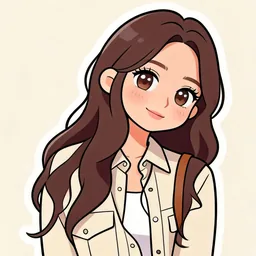
This example keeps the long hair, face angle and light jacket, converts noisy photographic shading into cleaner illustrated shapes, and finally maps those shapes to available bead colors. The AI image is not presented as a finished bead piece; it is an intermediate cleanup step that makes a low-resolution chart easier to recognize and place.
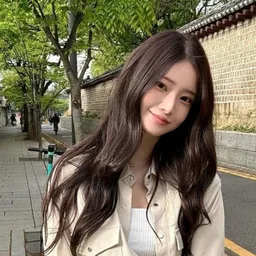
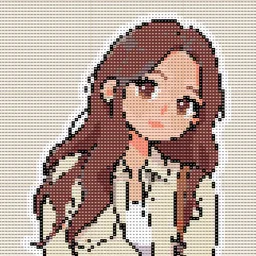
Choose headshot, half body or full body, then select simple, balanced or detail-first output. The tool recommends grid width, color count, estimated beads and finished width with standard 5mm beads.
Estimates are for planning. Use the generated color count as the final supply list.
Avoid a face hidden by shadow or hair. Keep the full hair silhouette and do not crop hands or feet at the edge when they matter.
Use a portrait or chibi style to turn gradients into flat color regions while preserving face shape, hairstyle and accessories.
In the editor, check eye height, mouth position, jaw line and hairline before spending cells on fabric texture.
Use roughly 48–64 cells for a headshot, 64–80 for half body and 80 or more for full body or multiple people.
It is optional, but real photos contain gradients, shadows and reflected colors. A clean illustration intermediate often reduces dirty colors and gives a more readable bead chart.
An 80×100 full grid tops out at 8,000 beads. With background removed, typical subject coverage is around 55–70%, so actual use is often lower.
Prioritize hair silhouette, face shape, spacing between eyes and brows, main clothing color and signature accessories. Minor skin shading can be simplified.
Yes. A clean avatar is often ready for direct conversion and may not need an AI intermediate. Upload it, set grid width and reduce the palette only as much as needed.