Upload a clear subject
Use a plain background or crop tightly around the subject. Remove product-page buttons, prices and unrelated text first.
A useful keychain pattern is not simply a large picture made smaller. It needs a readable silhouette, a limited palette and strong connections between every thin part. This page uses a real site example to show the full conversion and includes a planner for finished size, bead count and supply bags.
This is a real three-stage example from the site’s Charm style. The pose and red outfit stay recognizable, while tiny shading is merged into no more than ten main colors. No hook or keyring is added automatically, so the same clean pattern can become a keychain, magnet or small framed piece.
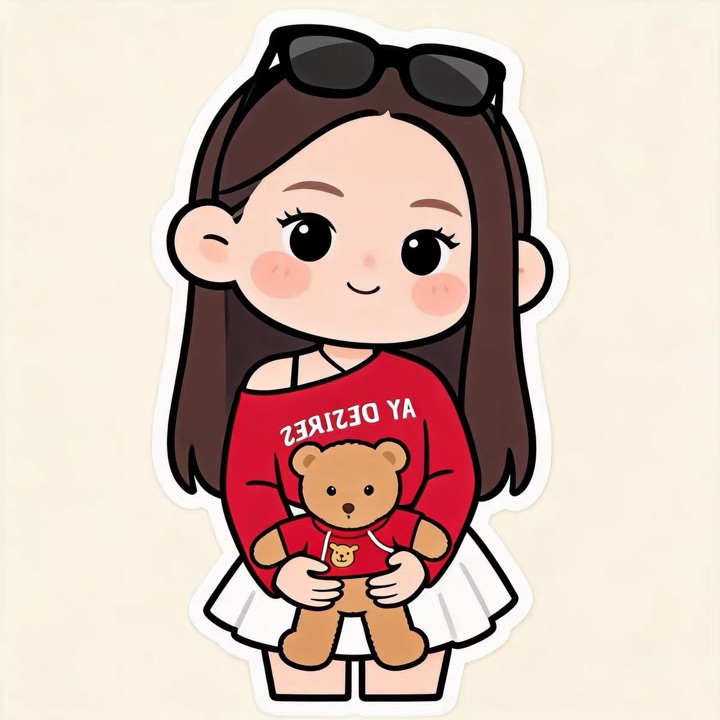
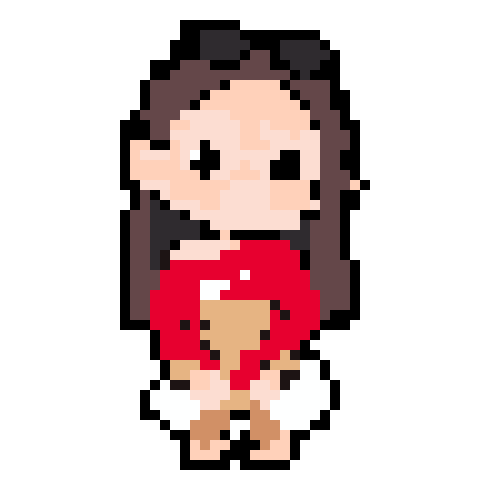
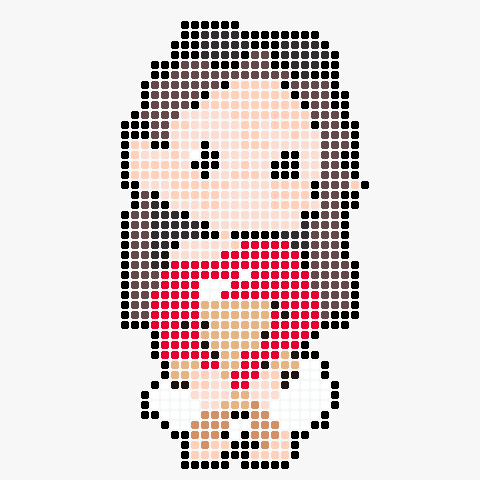
Enter the intended grid, bead size and subject coverage to estimate finished dimensions, beads to prepare and supply bags. Start around 24–36 cells wide and increase only when the subject truly needs more structure.
Estimates are for planning. Use the generated color count as the final supply list.
Use a plain background or crop tightly around the subject. Remove product-page buttons, prices and unrelated text first.
The AI creates a pixel sprite directly, preserves orientation and pose, simplifies color, and removes unrelated background details.
Fix eyes, outlines and one-cell bridges in the editor, then export the high-resolution chart with color codes and bead totals.
With standard 5mm beads, start at 24–36 cells wide for a finished piece around 12–18cm. Mini beads produce a much smaller item at the same grid size.
No. Generate a complete subject first so it can also work as a magnet or framed piece. Add a reinforced connection only after you know the size and position of the keyring hardware.
Yes. Charm style supports people, pets, vehicles and objects while preserving the source orientation and overall proportions.
Widen one-cell bridges to two cells, avoid isolated beads, and let the ironed piece cool completely under a flat weight. Reinforce the area around any attachment hole.
Yes. Open the full editor to move or crop the grid, recolor cells, remove a color and strengthen connections before exporting.